CTF challenges are an effective way to build practical cybersecurity skills, and an HTTP traffic analysis CTF focuses on understanding web requests, responses, headers, parameters, cookies, and transferred data. Instead of simply looking for a flag on a webpage, you analyze captured traffic to discover clues that may be hidden inside HTTP communication.
By learning how to inspect HTTP traffic, filter packets, follow conversations, and identify unusual data, you can develop skills useful for web security testing, digital forensics, and network analysis. This guide explains how to approach an HTTP traffic analysis CTF step by step in an authorized lab or CTF environment.
What Is an HTTP Traffic Analysis CTF?
An HTTP traffic analysis CTF is a cybersecurity challenge where participants analyze captured or live HTTP traffic to find a hidden flag or important clue.
The traffic may contain:
- HTTP GET and POST requests
- Server responses
- URLs and parameters
- Cookies and session information
- HTTP headers
- Form submissions
- Encoded or compressed data
- Hidden files or endpoints
- Authentication-related information
- Requests containing flag-related strings
The goal is usually not to attack a real system. Instead, the challenge provides a controlled environment or packet capture that allows you to investigate web traffic and identify the information needed to complete the challenge.
Why Is HTTP Traffic Analysis Important?
Web applications constantly exchange information between clients and servers. Understanding this communication can reveal how an application works and where important information is being transferred. During a CTF, traffic analysis can help you discover information that is not immediately visible through the website interface. For example, a request might contain a parameter that is not displayed on the page, while a server response may include an unusual header, comment, endpoint, or encoded value.
HTTP traffic analysis also develops skills that are useful beyond CTFs, including:
- Understanding web application behavior
- Investigating suspicious requests
- Identifying unexpected data exposure
- Analyzing authentication flows
- Examining API communication
- Understanding client-server interactions
OWASP’s Web Security Testing Guide includes testing approaches for monitoring incoming and outgoing HTTP requests to identify suspicious or unnecessary communication.
How to Solve an HTTP Traffic Analysis CTF
1. Understand the Challenge
Start by reading the challenge description carefully.
Look for clues about:
- The application or protocol involved
- Whether a PCAP file is provided
- Possible usernames or accounts
- Expected flag format
- Specific time periods or requests
- Any hints about the target traffic
Do not immediately inspect every packet manually. First, understand what the challenge expects you to find.
2. Open the Traffic Capture
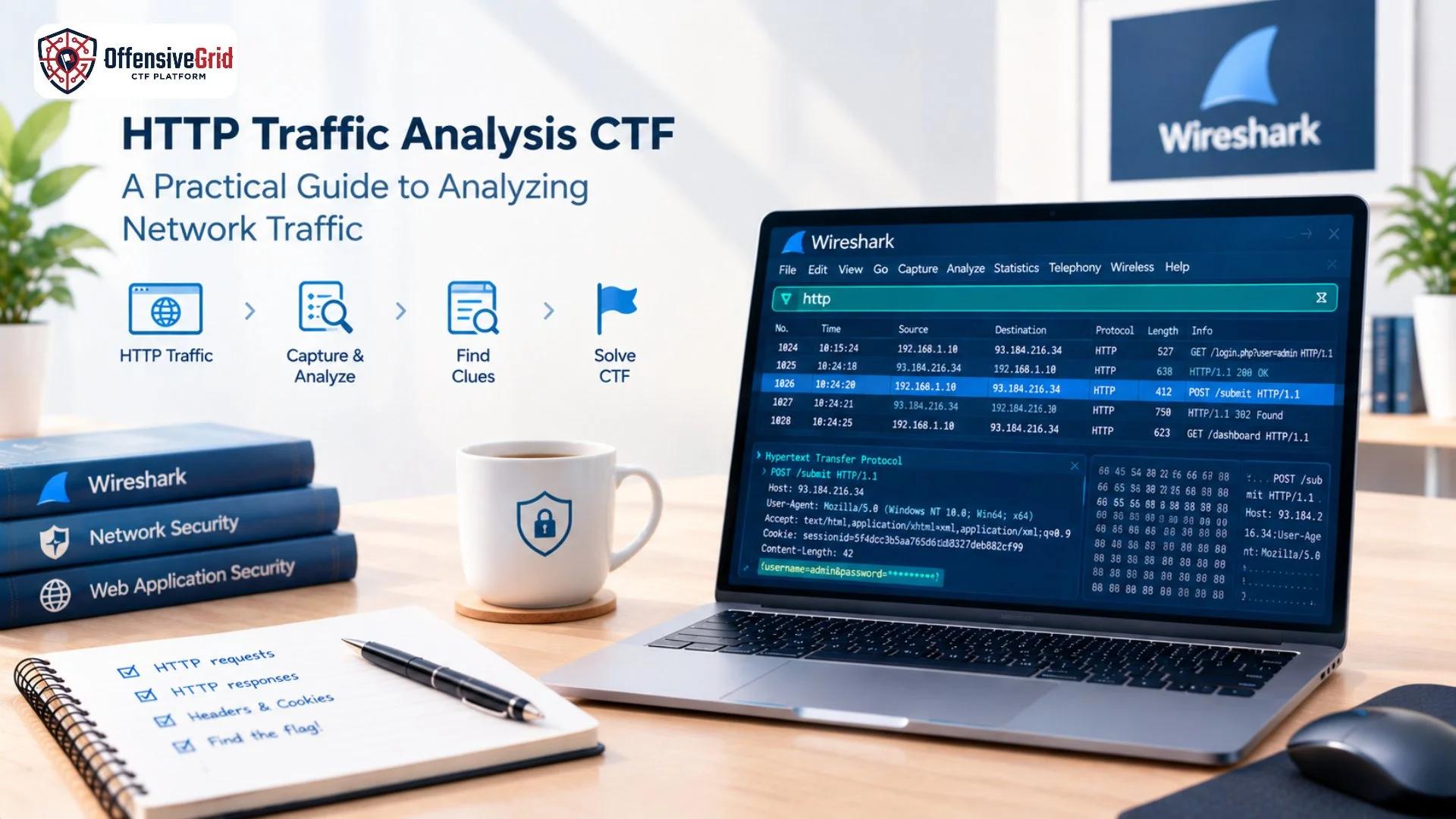
If the CTF provides a PCAP or PCAPNG file, open it with a packet-analysis tool such as Wireshark.
Wireshark provides display filters that allow you to focus on specific protocols, fields, and values instead of examining every packet individually.
Start with a broad HTTP filter:
http
If the capture contains HTTP traffic, this can significantly reduce the amount of unrelated traffic displayed.
3. Look for HTTP Requests
Next, focus on requests generated by the client.
A useful Wireshark filter is:
http. request
You can then examine:
- Request method
- Host
- URI
- Query parameters
- User-Agent
- Referer
- Cookies
- Request body
Wireshark’s documentation specifically supports filtering HTTP requests using fields such as http.request.
Pay particular attention to POST requests because they may contain form submissions, credentials in a lab scenario, parameters, or other challenge clues.
4. Analyze HTTP Responses
Requests are only one side of the conversation. The server’s responses can contain equally important information.
Look at:
- HTTP status codes
- Response headers
- Response body
- Content type
- Redirect locations
- Cookies
- Server information
- Downloaded files
For example, a 404 response might reveal a hidden endpoint through the requested URI, while a 200 response may contain a flag or encoded data.
You can filter specific response codes with expressions such as:
http.response.code == 404
Wireshark supports HTTP response-code fields and other HTTP-specific display filters.
5. Follow the HTTP Conversation
When you find an interesting packet, avoid analyzing it in isolation.
Follow the related TCP or HTTP conversation to understand the complete exchange between the client and server.
This can help you see:
Request → Server Processing → Response
For example:
GET /dashboard
↓
HTTP/1.1 200 OK
↓
Response contains hidden clue
A single packet may look harmless, while the complete conversation can reveal the sequence needed to locate the flag.
Useful Wireshark Filters for HTTP CTFs
Knowing a few display filters can make an HTTP traffic analysis CTF much easier.
| Purpose | Wireshark Filter |
| Show HTTP traffic | http |
| Show HTTP requests | http. request |
| Find GET requests | http. request.method == “GET” |
| Find POST requests | http. request.method == “POST” |
| Find 404 responses | http.response.code == 404 |
| Filter by IP | ip.addr == 192.168.1.10 |
| Find traffic on common HTTP ports | tcp.port == 80 |
| Search HTTP traffic for text | http contains “flag” |
Wireshark also supports operators such as contains and matches, which can help search packet fields and traffic for specific patterns.
Search for Flags and Interesting Data
Once you understand the traffic, start searching for challenge-specific clues.
Common flag formats might look like:
CTF{…}
FLAG{…}
OG{…}
However, do not search only for the word flag.
Look for:
- secret
- token
- key
- admin
- debug
- password
- config
- unusual parameters
- encoded strings
A flag might also be hidden inside a response body, URL parameter, cookie, HTTP header, or downloaded file.
Analyze Encoded Data
Some CTF challenges deliberately encode important information.
You may encounter:
- Base64
- URL encoding
- Hexadecimal
- HTML encoding
- JSON-escaped values
- Compressed content
For example, a value such as:
Q1RGe2h0dHBfYW5hbHlzaXN9
may look meaningless at first but could represent readable text after decoding. Do not assume that every long string is a secret. First identify its context and encoding before attempting to decode it.
Combine Traffic Analysis With Web CTF Skills
HTTP analysis becomes even more useful when combined with broader web security knowledge. Understanding requests, responses, endpoints, parameters, and application behavior can help you solve more complex challenges. If you are new to web-based CTFs, our guide on how to solve web CTF challenges can help you build a structured approach to reconnaissance, request analysis, vulnerability identification, and flag discovery. Similarly, learning about Penetration Testing Tools can help you understand where tools such as Wireshark, Burp Suite, Nmap, and other security utilities fit into a broader testing workflow.
Practice HTTP Traffic Analysis CTF Challenges Safely
The best way to improve traffic-analysis skills is through repeated hands-on practice. Users can practice these techniques on Offensive Grid in controlled CTF/lab environments, where practical cybersecurity scenarios can be used to build skills without targeting unauthorized systems. Offensive Grid provides hands-on training environments and CTF ranges, with its training library covering areas such as web application security, network security, digital forensics, and other cybersecurity domains. When practicing, focus on understanding why a particular packet or request is important rather than simply searching for the flag.
Common Mistakes in HTTP Traffic Analysis CTFs
Inspecting Every Packet Manually
Large packet captures can contain thousands of packets. Use filters to narrow the investigation.
Focusing Only on Requests
Responses, cookies, headers, and downloaded content can contain important clues.
Ignoring Parameters
Query strings and POST parameters can reveal hidden functionality or challenge information.
Decoding Everything Immediately
First, understand where a suspicious value came from and what role it plays in the application.
Forgetting the Challenge Context
The challenge description often provides valuable hints. Use those hints to guide your investigation.
A Simple HTTP Traffic Analysis Workflow
For most beginner and intermediate challenges, use this workflow:
Read the challenge → Open the PCAP → Filter HTTP → Identify requests → Analyze responses → Follow conversations → Search for clues → Decode suspicious data → Locate the flag
As you become more comfortable with Wireshark, you can create more precise filters and combine multiple conditions. Wireshark’s filtering system supports logical operators and comparisons for narrowing traffic efficiently.
FAQs
What is an HTTP traffic analysis CTF?
It is a CTF challenge where participants examine HTTP requests, responses, headers, parameters, and related network traffic to discover a hidden flag or clue.
Which tool is commonly used for HTTP traffic analysis?
Wireshark is one of the most useful tools for analyzing packet captures and filtering HTTP traffic.
Can HTTP traffic analysis reveal passwords?
In a controlled CTF or lab, intentionally exposed credentials or authentication data may be included as part of the challenge. Real-world traffic should only be analyzed when you have proper authorization.
Is HTTP traffic analysis useful for cybersecurity?
Yes. It helps develop skills in network analysis, web security testing, digital forensics, incident investigation, and understanding application communication.
Conclusion
An HTTP traffic analysis CTF teaches you how to look beyond the visible webpage and understand the communication between a client and server. By learning to filter HTTP packets, analyze requests and responses, follow conversations, inspect parameters, and recognize encoded information, you can become much more effective at solving web and network-based CTF challenges. The key is to work systematically rather than randomly searching through packets. With regular practice in authorized CTF and lab environments, HTTP traffic analysis can become a valuable part of your cybersecurity skill set.