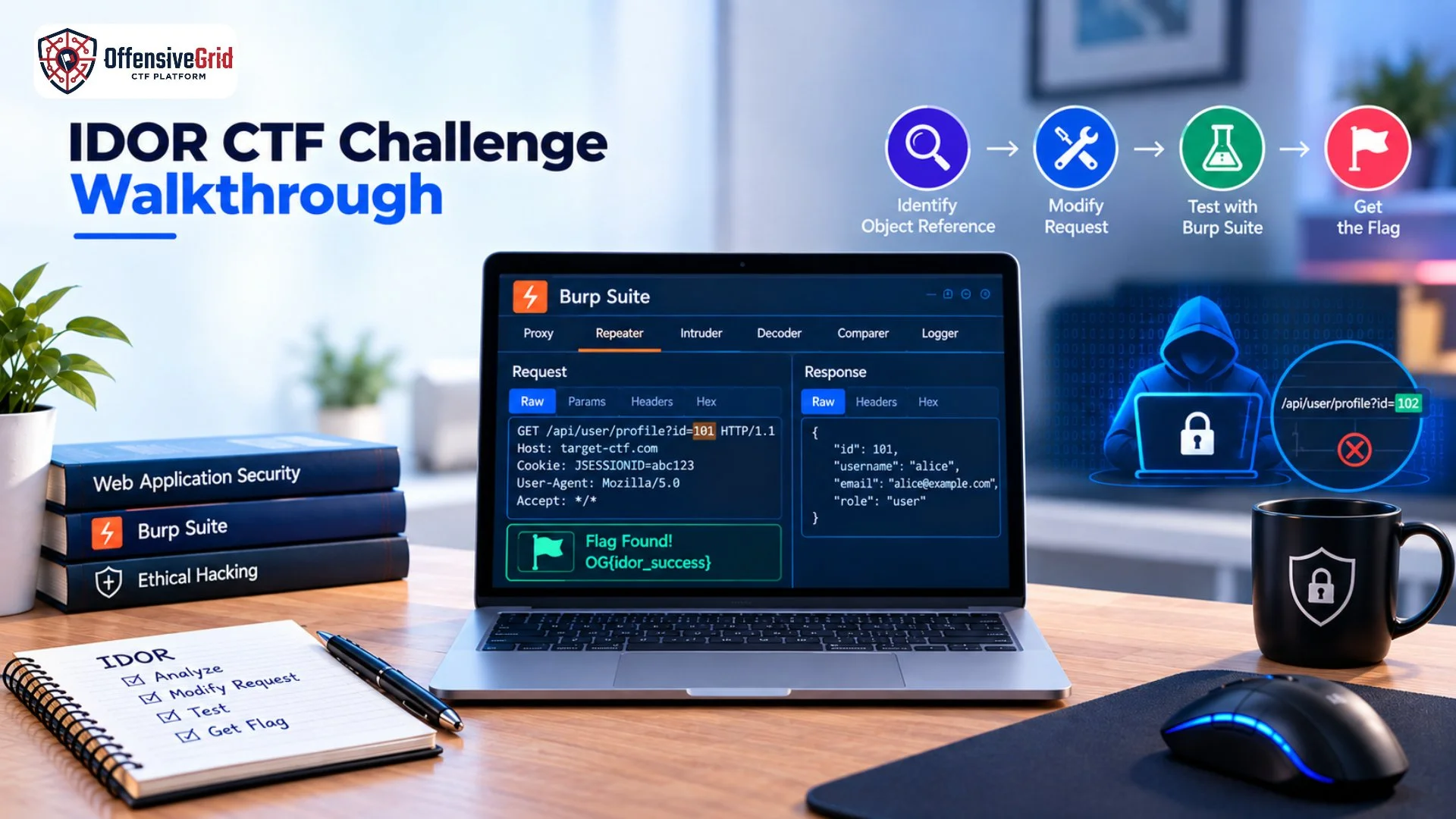
An IDOR CTF challenge walkthrough is a practical way to understand how insecure direct object references can lead to unauthorized access to application resources. IDOR, or Insecure Direct Object Reference, occurs when an application uses a user-controlled reference such as an account ID, document ID, invoice number, or API object identifier without properly checking whether the current user is authorized to access that object.
In a CTF environment, IDOR challenges allow learners to practice identifying these access control weaknesses in a controlled and authorized application. This guide explains how an IDOR challenge works, how to identify the vulnerable parameter, how to test it using Burp Suite, and how to approach the challenge safely.
What Is IDOR?
Insecure Direct Object Reference is an access control weakness where an application exposes a reference to an internal object and fails to verify authorization when that reference is changed.
For example, imagine a vulnerable application uses:
/profile?id=101
If changing the value to:
/profile?id=102
Allows User A to view User B’s profile without authorization, the application may contain an IDOR vulnerability. OWASP describes IDOR as a type of access control vulnerability and places it under A01:2025 Broken Access Control.
Why Are IDOR Vulnerabilities Important?
IDOR vulnerabilities can expose sensitive resources belonging to other users. Depending on the application, an attacker may potentially access profiles, documents, invoices, support tickets, orders, or other objects. The problem is not simply that an identifier is visible. The core issue is the absence of proper server-side authorization checks for the requested object. OWASP specifically recommends checking authorization for each object access rather than relying on identifiers being difficult to guess. This makes IDOR an important concept for anyone learning web application security.
IDOR CTF Challenge Walkthrough
For this walkthrough, assume you are working with an intentionally vulnerable CTF application that provides two test accounts and a user-specific resource. The objective is to determine whether one authorized CTF user can access another user’s resource by changing an object reference.
Step 1: Understand the CTF Application
Start by exploring the application normally.
Log in using the credentials provided by the challenge and look for features such as:
- User profiles
- Account settings
- Orders
- Documents
- Messages
- Invoices
- Support tickets
- API requests
The goal is to understand how the application identifies individual objects. Do not immediately change parameters randomly. First, understand the normal application workflow.
Step 2: Identify Object References
Look at the URLs and HTTP requests generated by the application.
You might see a request such as:
GET /account?id=101
or:
GET /api/orders/501
or:
GET /documents/1001
The number, UUID, filename, or other value may represent an object reference.
An IDOR challenge often becomes apparent when a user-controlled value directly determines which resource the server returns. PortSwigger describes this type of testing as identifying parameters or other locations where exposed object references may exist.
Step 3: Capture the Request in Burp Suite
Burp Suite makes IDOR testing easier by letting you inspect and modify HTTP requests in an authorized lab. If you’re unfamiliar with Burp, our guide on how to use Burp Suite explains how Proxy, HTTP history, Repeater, and other features work.
Open the CTF application through Burp’s browser and perform the action that displays your own resource.
Then open:
Proxy → HTTP history
Find the relevant request and inspect its parameters.
Look for values such as:
- id
- user_id
- account
- document
- order_id
- invoice_id
- profile
These parameters are not automatically vulnerable. They simply indicate areas that may require authorization testing.
Step 4: Send the Request to Repeater
Once you identify a potentially interesting request, send it to Burp Repeater. Repeater allows you to modify and resend an HTTP request while observing how the application responds.
For example, a CTF request might contain:
GET /profile?id=101
Change the object reference to another value within the challenge environment:
GET /profile?id=102
Then send the request and compare the response.
The purpose is to determine whether the server actually verifies that the authenticated user is authorized to access the referenced object.
Step 5: Compare the Responses
Pay attention to the differences between the original and modified requests.
Useful indicators include:
- HTTP status code
- Response length
- Username or account information
- Object ownership
- Application messages
- Returned JSON data
- Access-denied messages
A successful IDOR test does not simply mean that the server returned a response. The important question is whether it returned a resource belonging to another user without proper authorization. PortSwigger’s IDOR testing guidance uses the same basic principle: identify an exposed object reference and test whether manipulating it provides access to another object.
Step 6: Test Horizontal Access Control
Many IDOR CTF challenges demonstrate horizontal privilege escalation. Horizontal access control means users with similar privileges should only be able to access their own resources.
For example:
- User A → Account A
- User B → Account B
If User A can change an object reference and access Account B’s private resource, the application may have an IDOR-related authorization weakness. PortSwigger recommends testing horizontal access controls with two accounts having equivalent privileges and comparing requests between those users.
Step 7: Look for Other Object Types
After confirming the concept in a CTF, examine whether the challenge contains other object references.
An application may use IDs for:
- Profiles
- Orders
- Files
- Messages
- Tickets
- Invoices
- Projects
- API resources
A good CTF challenge may intentionally include multiple endpoints so learners can recognize that the underlying problem is an authorization failure rather than a single vulnerable URL.
Step 8: Find the CTF Flag
In many IDOR CTF challenges, the objective is to access a protected object containing a flag. After successfully accessing the intended challenge resource, inspect the page or response for the flag.
The important learning outcome is not simply obtaining the flag. You should understand:
- Which object reference was exposed.
- Where the reference appeared.
- Why the server accepted the modified reference.
- Which authorization check was missing.
- How the vulnerability could be prevented.
This turns a CTF solution into a reusable web security skill.
Common IDOR Variations in CTF Challenges
URL Parameter IDOR
The object identifier appears directly in a URL or query parameter.
Example:
/account?id=123
Changing the identifier may reveal another user’s resource.
API-Based IDOR
Modern applications frequently use APIs to access objects.
For example:
GET /api/users/123/orders
A CTF may test whether the application verifies that the authenticated user is authorized to access the requested user’s data.
JSON Body IDOR
Object references can also appear inside POST, PUT, or PATCH requests.
For example:
{“document_id”:123}
A secure application should verify ownership or authorization on the server before returning or modifying the object.
IDOR in File References
Applications may use identifiers or filenames to access documents or uploaded files.
If the server does not verify ownership, manipulating the reference may expose another user’s resource.
How to Prevent IDOR Vulnerabilities
Developers should not rely on users being unable to guess identifiers. The primary defense is server-side authorization checking for every requested object. OWASP recommends verifying whether the current user is authorized to access the specific object involved in each request.
Other useful security practices include:
- Enforce object-level authorization.
- Apply least-privilege principles.
- Validate ownership on every request.
- Avoid relying on hidden fields for authorization.
- Test read and write operations separately.
- Use automated authorization regression tests.
- Use unpredictable identifiers as defense in depth, not as the primary security control.
OWASP also recommends testing authorization across operations such as read, create, update, delete, and export.
Practice IDOR Challenges Safely
IDOR testing should only be performed against applications you own or environments where explicit authorization has been provided. For hands-on learning, intentionally vulnerable CTF platforms and security labs are ideal. PortSwigger’s Web Security Academy includes dedicated access-control and IDOR labs designed for practicing these concepts in deliberately vulnerable environments.
Offensive Grid can also provide a practical environment for developing web security and CTF skills through controlled cybersecurity challenges. Learners can practice identifying vulnerabilities, analyzing requests, and working through security scenarios without targeting unauthorized production systems.
Common Mistakes in an IDOR CTF
Assuming Every Numeric ID Is Vulnerable
A visible identifier does not automatically mean an application has an IDOR vulnerability. The server must fail to properly enforce authorization.
Testing Only GET Requests
IDOR-related authorization problems can also affect actions that modify or delete resources. Security testing should consider the relevant operations supported by the application.
Ignoring the Authentication Context
Always understand which user is authenticated when testing an object reference. The difference between User A accessing User B’s resource is central to many IDOR scenarios.
Focusing Only on the Flag
The flag proves that the challenge objective was achieved, but understanding the authorization failure is the more valuable security lesson.
FAQs About IDOR CTF Challenges
What is an IDOR CTF challenge?
An IDOR CTF challenge is a controlled security exercise where participants identify and exploit an insecure direct object reference to access an unauthorized resource and usually retrieve a flag.
Is IDOR the same as broken access control?
IDOR is a specific type of access control weakness. OWASP classifies IDOR under Broken Access Control in the OWASP Top 10:2025.
Can Burp Suite be used to test IDOR?
Yes. Burp Suite can help testers capture requests, modify object references, resend requests with Repeater, and compare responses during authorized testing.
How can I practice IDOR legally?
Use intentionally vulnerable CTF platforms, local applications, Web Security Academy labs, or authorized cybersecurity training environments.
Conclusion
An IDOR CTF challenge walkthrough provides a practical introduction to one of the most important web application authorization weaknesses. The basic process involves understanding the application, identifying object references, capturing requests, modifying references in a controlled lab, comparing responses, and determining whether server-side authorization is properly enforced. The key lesson is that hiding or randomizing an identifier is not enough. Applications must verify authorization for every object and operation. By practicing IDOR scenarios in authorized CTF environments, learners can build practical skills that apply to real-world web application security testing.